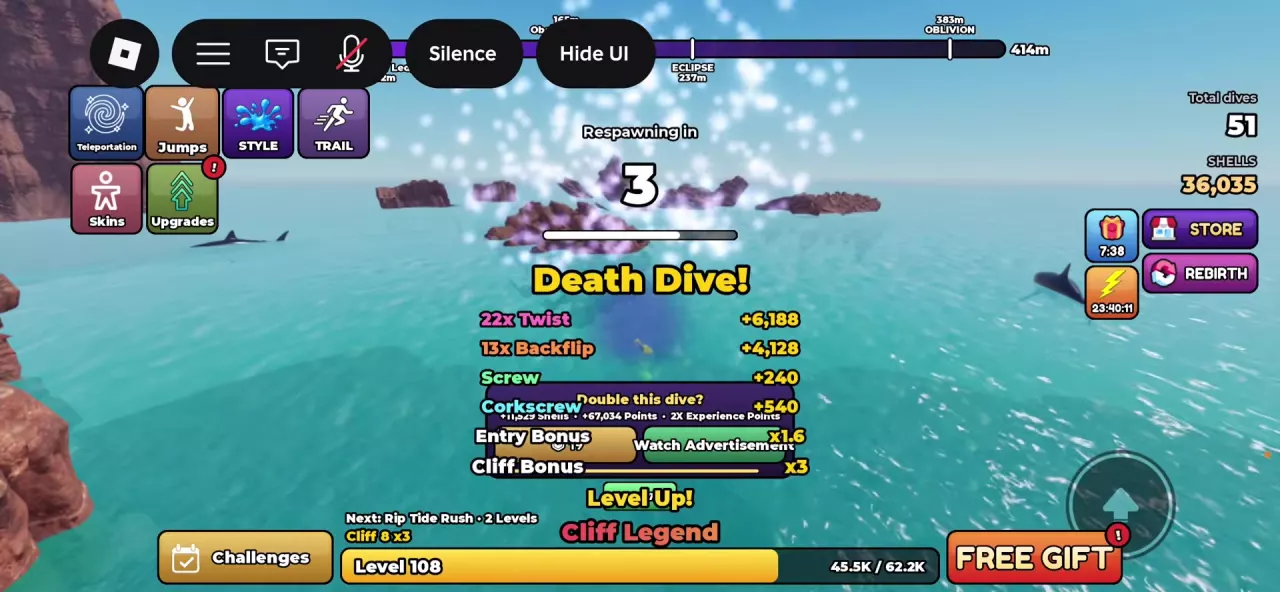
Choose an Entry Move
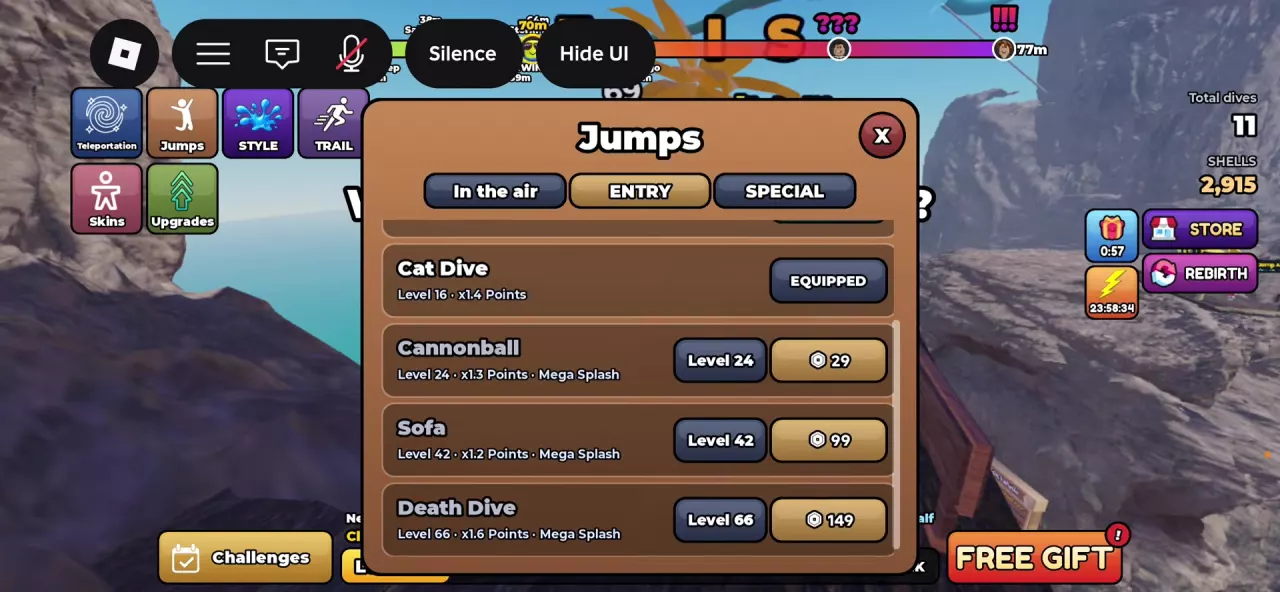
Open Jumps from the left-side menu and select ENTRY. This tab controls your water-entry move; In the air contains aerial poses, while SPECIAL contains special dives. For those other choices, use the Jumps and Combos reference.
Check the move's level requirement and availability. EQUIPMENT is the selection control shown for an available choice; EQUIPPED identifies the active selection.
| Entry move | Required level | Menu Points multiplier | Additional menu label | Robux button shown alongside requirement |
|---|---|---|---|---|
| Cat Dive | Level 16 | ×1.4 | — | — |
| Cannonball | Level 24 | ×1.3 | Mega Splash | 29 Robux |
| Sofa | Level 42 | ×1.2 | Mega Splash | 99 Robux |
| Death Dive | Level 66 | ×1.6 | Mega Splash | 149 Robux |
These multipliers are the menu's Points values. The Robux buttons appear alongside the level requirements; treat the listed level and purchase option as separate information when checking availability.
Choose an available move whose prompt you can consistently follow. A higher level requirement does not always mean a higher menu Points multiplier: Sofa is listed below both Cat Dive and Cannonball.
Follow the Active Entry Prompt
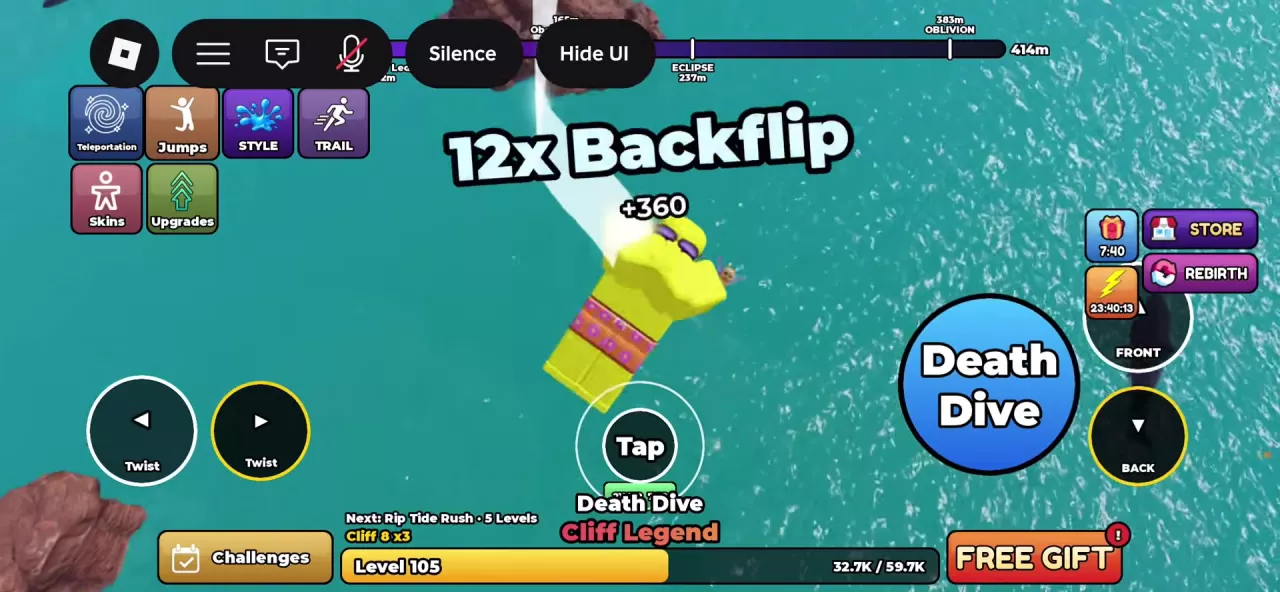
Watch the name of your active entry move during descent. The touch interface changes its prompt to match the move, so follow that cue instead of expecting Head first on every dive.
Sofa
- Watch Sofa in 3, 2, 1 while descending. The central Tap prompt remains gray during the countdown.
- Wait for the countdown to end. The central Tap / Sofa ring lights up, and a blue Sofa button appears on the right.
- Use the entry prompt before hitting the water, then check for Sofa Splash in the result.
Death Dive
- Wait while the Death Dive countdown is active and Tap is gray.
- When the text changes to Death Dive, look for the bright outline and outer ring around Tap, together with the blue Death Dive control on the right.
- Tap at that cue. After impact, check for Death Dive!.
The other two moves have these touch-interface cues:
- Cat Dive: look for the Cat Dive button and the central Tap prompt during descent.
- Cannonball: watch Cannonball in 3, 2, 1. When the countdown finishes, a central Tap / Cannonball prompt and a blue Cannonball control appear.
If Head first is your active prompt, follow its own countdown and control. The basic diving guide explains that entry along with takeoff and aerial controls.
Check the Entry Result
After impact, read the entry name and Entry Bonus in the result. Seeing a move's button during descent means its prompt is available; it does not confirm that you completed the move.
| Selected move | Successful result label |
|---|---|
| Cannonball | Cannonball! |
| Sofa | Sofa Splash |
| Death Dive | Death Dive! |
Keep the menu's Points multiplier separate from the result's Entry Bonus. A successful Cannonball at Vertigo has an Entry Bonus of ×1.3. Death Dive! results have ×1.6, and Late Dive Bonus can appear in the same result. Cat Dive's ×1.4 and Sofa's ×1.2 are their menu Points values, not values to substitute for the Entry Bonus shown after a dive.
First practice getting the intended result consistently. Once that is reliable, work on later entry timing using the higher-score practice guide.
A successful entry also does not guarantee a positive score: Clean Entry can still finish at zero when the result says No tricks. If the result is unexpected or the total is zero, use the scoring guide to check the entry multiplier and completed tricks.