

Accept a Competition Invitation
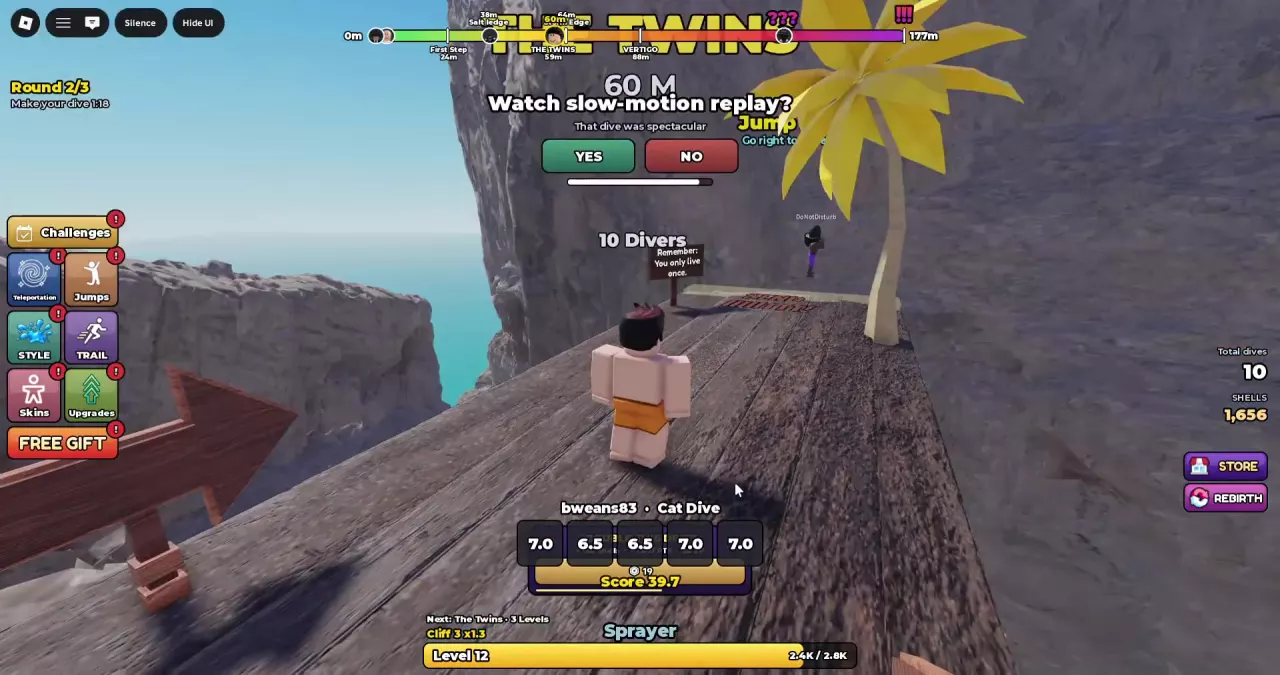
When the Diving Competition invitation appears, select YES to participate or NO to decline.
A visible competition overlay alone does not mean you joined. It can display other players’ results, so accept the invitation before treating your dives as competition entries.
If you need help with takeoff, airborne controls, or landing, follow the basic diving controls before entering.
Follow the Three Rounds
- When Round 1/3 appears, check the Make your dive countdown and complete your dive before it runs out.
- Continue into Round 2/3 and Round 3/3, following the countdown shown for each round.
- After the third round, check RESULTS for the final ranking.
The countdown shows the time remaining in the active round. It continues during landing and respawning; returning to the platform does not itself mean a new round has started. Use the round label to track progress instead of counting your landings.
Read the Judges' Panel
Check the player name first. The panel at the bottom of the screen cycles through competitors, so the result currently displayed may belong to someone else.
| Panel element | What to read |
|---|---|
| Player name | Whose dive the panel is showing |
| Dive or entry label | The named action or entry result, such as Cat Dive or Clean Entry |
| Five score cards | The judges’ individual ratings for that displayed dive |
| Score | The separately displayed competition score |
Read Score directly rather than treating the five cards as the final result. Keep this panel separate from the PTS or TOTAL on your personal dive breakdown.
If your own breakdown says Belly flop while the competition panel says Clean Entry, check the name above the cards. A different competitor’s Clean Entry does not change your own landing result.
Check Final Placement
After the three rounds finish, RESULTS displays the top three competitors with their placement and competition score. Match the names to the standings to see who finished on the podium.
Use this screen for final placement, the judges’ panel for individual competition results, and your personal dive breakdown for that dive’s PTS or TOTAL. They are separate displays and should not be read interchangeably.
For a personal dive that ends with zero points, use the scoring guide to check the action breakdown and entry result. For practice between competitions, see how to improve your score.